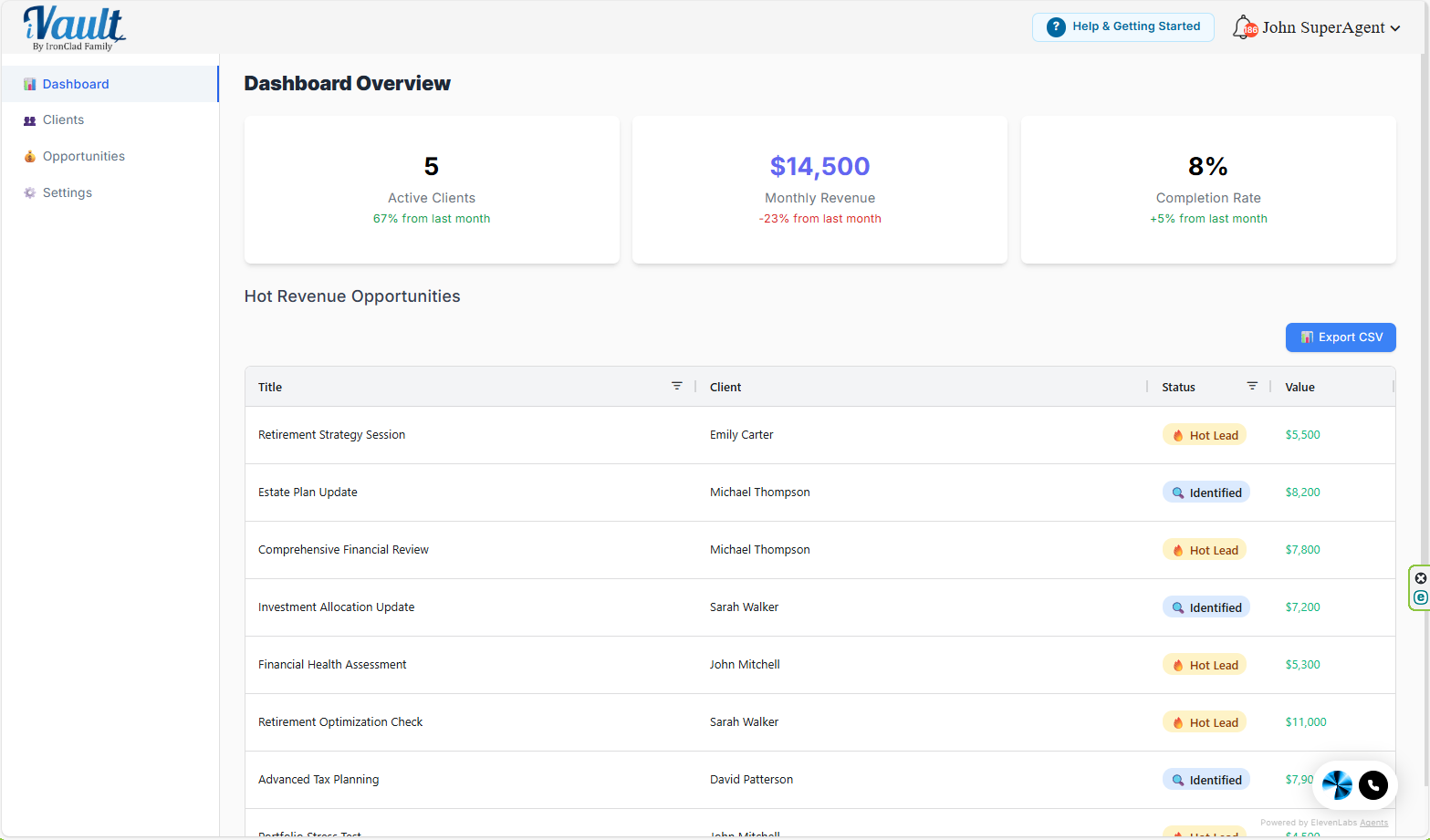
Your Advisor Dashboard is the first screen to open each day. It gives you a real-time snapshot of client momentum and revenue momentum, so you know exactly where to focus next.
What this page is for
- Client momentum: who's progressing, who's stalled, who needs outreach
- Revenue momentum: which opportunities are active and which are closest to closing
- Decision-making: what to do next (go to Clients, Opportunities, or Settings)
What you'll see on the dashboard
- Active Clients — clients currently in progress
- Monthly Revenue — however your account is configured to represent revenue
- Completion Rate — overall client completion performance
- Hot Revenue Opportunities — your highest-priority pipeline items
Note: some accounts may show additional features during rollout. If you don't see something referenced in an article, your account may not have that feature enabled yet.
Recommended daily workflow (5 minutes)
- Scan Completion Rate to spot potential churn risk.
- Open Hot Revenue Opportunities and pick your top 3 to advance today.
- Go to Clients and contact anyone clearly behind.
- Go to Opportunities and update statuses so your pipeline stays accurate.
Why this matters:
- You instantly see which clients are falling behind
- You can prioritize the highest-value opportunities
- You avoid missed follow-ups and dropped relationships
The advisor value
As clients fill in their vaults, the dashboard becomes a source of real planning conversations. What surfaces:
- Beneficiary designations that conflict with the will
- Outdated or missing estate documents
- Insurance coverage gaps
- Unprotected digital assets and cryptocurrency
- Records the client never assigned to a vault — information they believe is protected but that would reach no one
Each of these is a genuine planning need, and each strengthens the client relationship regardless of how you're paid — a demonstrable win for a fee-only advisor, a review opening for a fee-based advisor, a drafting conversation for an estate planner. None of them depend on selling a product.
For deeper vault guidance, see the Managing Client Vaults guide.
Related Articles
Was this article helpful?
That’s Great!
Thank you for your feedback
Sorry! We couldn't be helpful
Thank you for your feedback
Feedback sent
We appreciate your effort and will try to fix the article