Creating and Maintaining Your Funeral Plan
Families make these decisions in about forty-eight hours. Grieving, exhausted, often disagreeing, and usually spending far more than they meant to — because nobody wants to be the one who suggested the cheaper option.
Whatever you write here spares them that. Even three lines. “Cremation, no big service, play something by Al Green” is enough to turn an argument into a decision already made.
There are two places for this in your vault: Funeral › Funeral instructions for the service itself, and Funeral › Burial plots for where you'll be laid to rest. You can use the guided wizard, fill in the form directly, or attach a document or video in your own words.
Step 1: Open the Funeral section
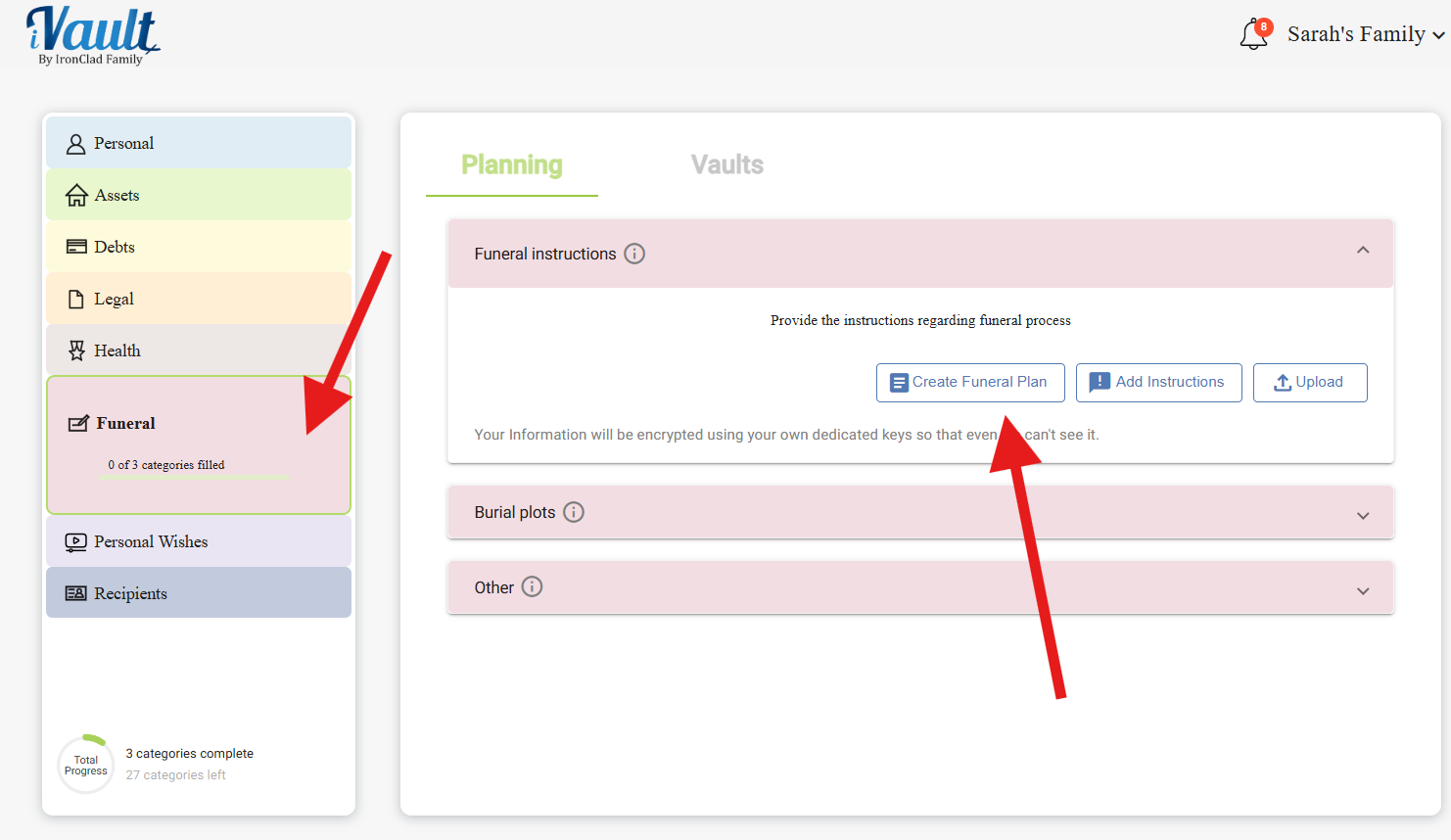
Click Funeral in the left-hand navigation, then open Funeral instructions.
Step 2: Choose how you want to do this
Under MAKE A NEW ONE you'll find Create funeral plan and Add instructions. Below the OR, the form lets you record what you've already arranged — a prepaid plan, a contract with a funeral home, or wishes you've written elsewhere.
Pick whichever gets you started. The wizard asks the questions for you; the form is faster if you already know what you want to say.
Step 3: What the funeral instructions form asks
Whether you go through the wizard or fill the form in directly, these are the questions — and none of them require a final answer today. A partly filled plan is still a plan.
- What kind of service would you like? (required) — traditional burial service, cremation, memorial or celebration of life, green (natural) burial, donation to science, or no service at all. That last option is a real choice, and saying so in writing gives your family permission to honor it without guilt.
- Funeral home or provider — if you have one in mind. Even a name and a town saves your family from calling around while grieving.
- Have you prepaid any of this? — fully prepaid, partly, no, or not sure. This is one of the most valuable fields here. Prepaid funeral plans are regularly paid for twice because the family never knew one existed.
- Prepaid plan / policy number — the number the funeral home will ask for
- Who should lead the service? — clergy, a celebrant, a family member, or nobody
- Songs, readings, or rituals you'd want included — this is where people's plans become recognizably theirs. A hymn, a poem, a particular passage, the song that was playing at your wedding. Your family will be grateful for something concrete to organize around.
- Who should make these arrangements? — naming one person prevents the most common conflict of all. It isn't a judgment on anyone else; it's clarity about who has the final say.
- Anything else your family should know — open text. Who to notify. Which relatives don't speak. What to do with flowers or donations. What you'd want said.
Step 4: Working through the wizard
If you're using the guided version:
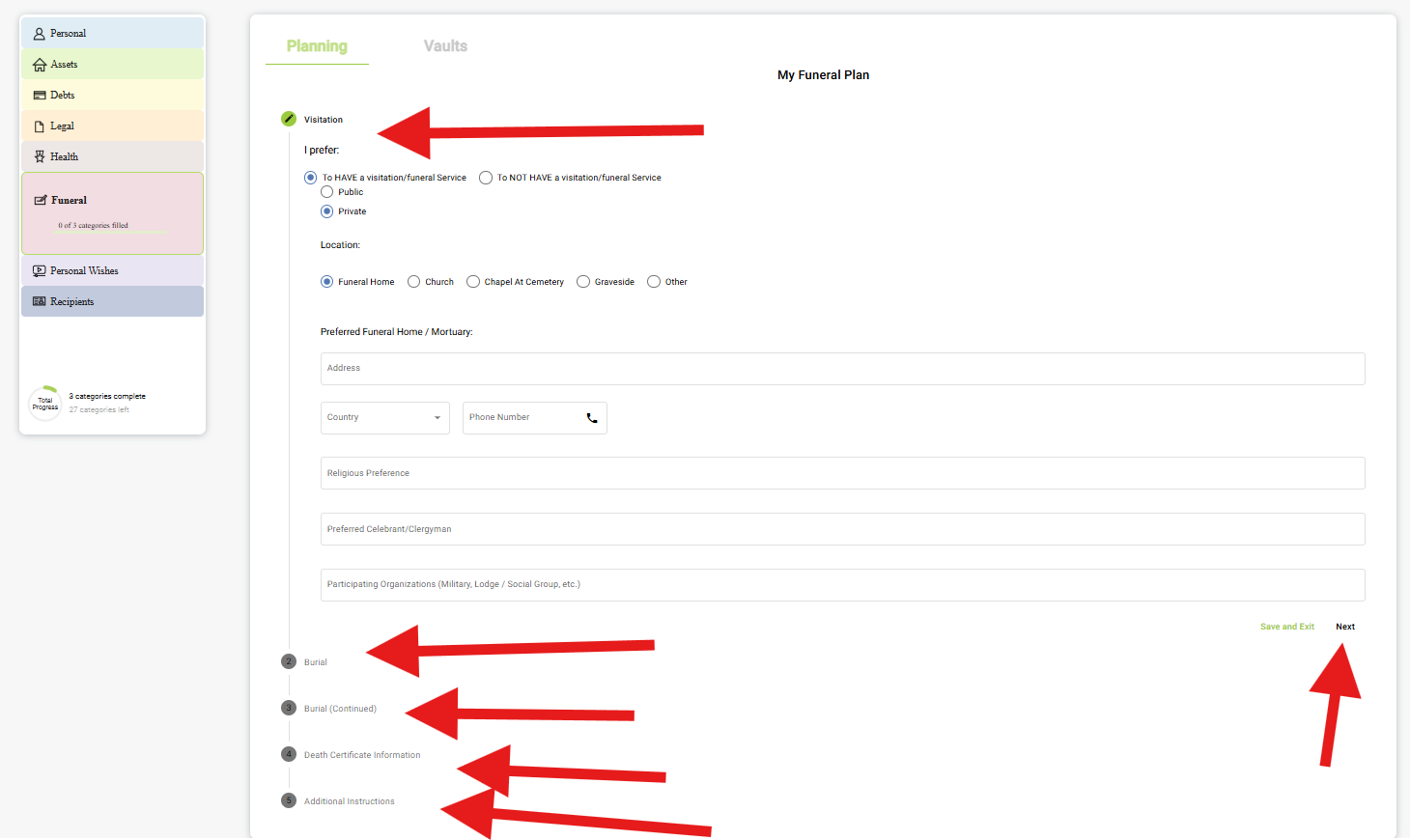
- Click Next to move forward
- Click Back to review or change earlier answers
- Save periodically so you don't lose anything
- Use Save and Exit to pause — you'll resume where you left off
Take it in stages if you need to. Most people don't do this in one sitting, and there's no reason to.
Step 5: Burial plots
If you own a plot — or your family does — record it under Funeral › Burial plots. Family plots bought decades ago are the classic lost asset: everyone knows one exists, nobody knows where the deed is.
- How would you like to be laid to rest? (required) — burial, cremation, entombment in a mausoleum, scattering, or something else
- Cemetery or location — and for scattering, the place that matters
- Plot or niche number — if you already own one
- Who holds the plot deed? — often a parent or grandparent, sometimes someone who's since died. Whatever the answer, write it down.
- Headstone or marker wishes — inscription, style, material. What you'd want it to say.
- Is this prepaid? — yes, no, or not sure
- Who should handle this? — the person responsible for the arrangements
- Any other instructions
Step 6: Attach documents or a video
Under Supporting document, attach a prepaid funeral contract, a cemetery deed, or anything else that backs up what you've written.
You can also record a short video and attach that. Some people find it easier to say this out loud than to write it, and there's something in hearing it in your own voice that a form can't carry. It doesn't need to be polished. Five minutes at the kitchen table is plenty.
Step 7: Assign it to a vault — and think about timing
This one needs more thought than most records, because of when it's needed.
Funeral decisions happen in the first two or three days. A vault set to release on death or incapacitation works — but if your family is making arrangements before that vault reaches them, your wishes arrive too late to matter.
Two ways to handle it:
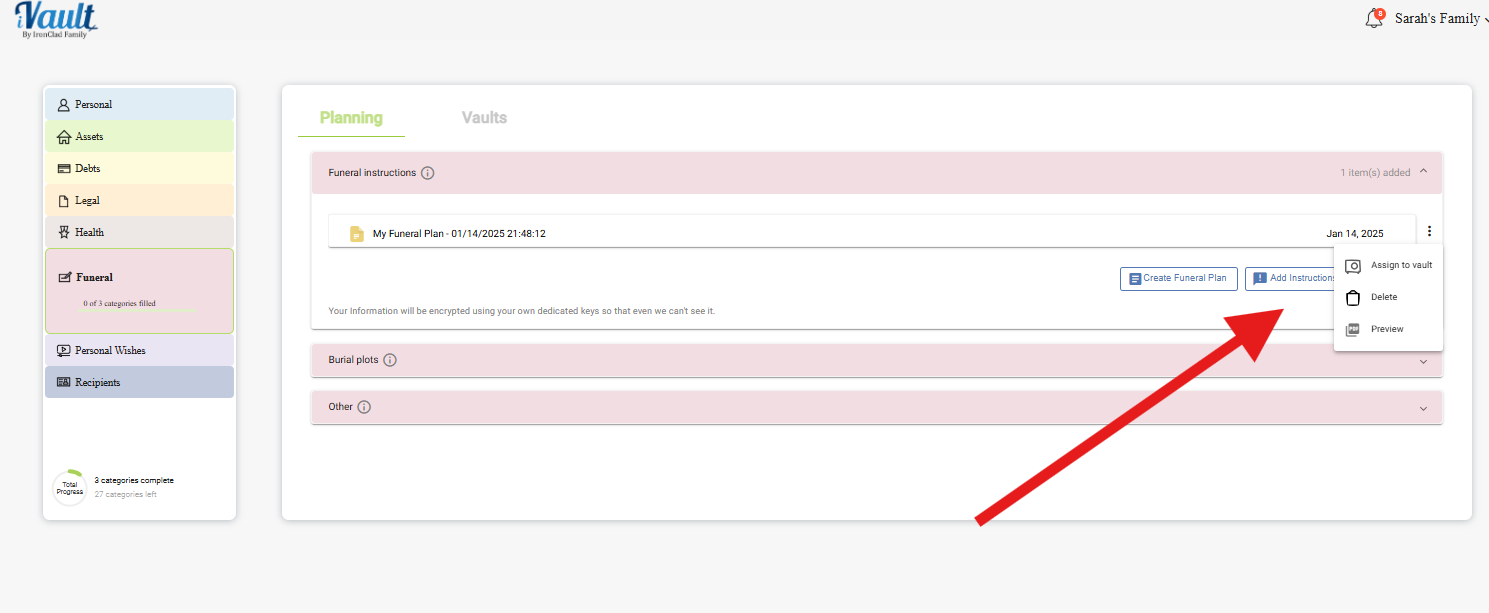
- Assign your funeral plan to an emergency vault alongside your other time-critical records, set to release immediately on request
- Use the preview link to share it with your spouse or the person you've named now, so they already know what you want
The second option is worth the awkwardness. A conversation now — even a short, uncomfortable one — is worth far more than a perfect document nobody opens in time.
Keeping it current
Wishes change, and that's fine. Revisit this after a move to another state, a change in religious practice, buying or selling a plot, prepaying arrangements, or the death of someone you'd named to handle things.
Use the ⋮ menu › Edit details on the existing record rather than creating a new one. Your family should find one plan, not three from different decades.
Important notes
Your funeral plan here is designed to guide your loved ones and reduce the weight on them at the worst possible time. It doesn't replace formal contracts or prepaid arrangements with a funeral home — but it's how your family finds out those arrangements exist.
Related Articles
Was this article helpful?
That’s Great!
Thank you for your feedback
Sorry! We couldn't be helpful
Thank you for your feedback
Feedback sent
We appreciate your effort and will try to fix the article